SolidWorks PDM
Beginner’s Guide to SolidWorks PDM Administration
A PDM administrator protects engineering data while keeping workflows simple enough for users to follow.
Core responsibilities
- Manage users, groups, and permissions.
- Maintain workflows, states, and transitions.
- Control revision schemes and file templates.
- Coordinate backups and disaster recovery.
- Support users and document standard procedures.
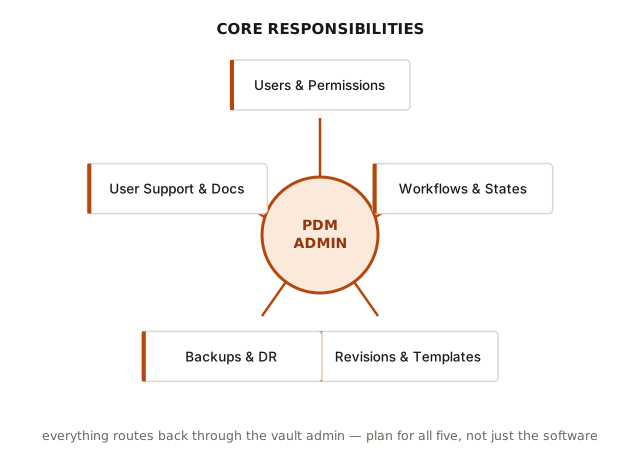
The vault is a SQL Server database for metadata, versions, and permissions, paired with an archive server that holds the actual files — the vault view in Windows Explorer is just a client that talks to both. Every one of the five responsibility areas above ultimately touches that pair, which is why admin problems tend to cascade: a permissions mistake affects who can reach files, a workflow mistake affects what state those files can move into, and a backup mistake can affect whether either the database or the archive is recoverable at all.
What to learn first
Start with vault structure, check-in/check-out behavior, data cards, references, workflows, permissions, and backup verification.
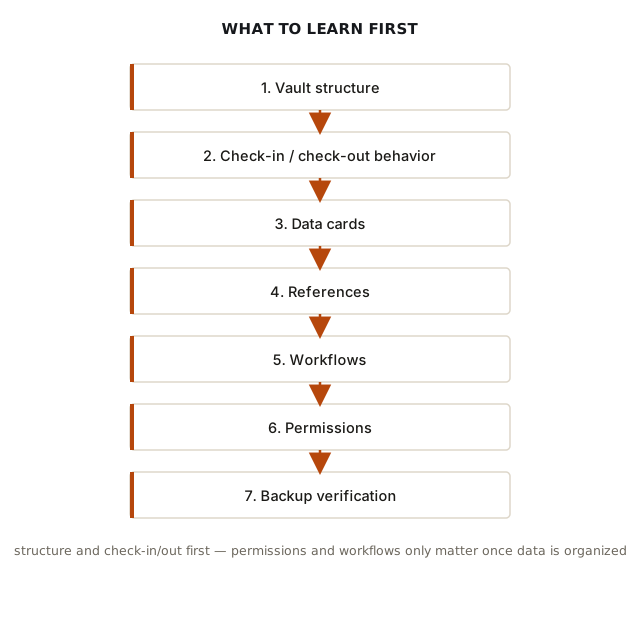
Vault structure and check-in/check-out come first because they're the hardest to retrofit later. Check-out is an exclusive lock, not a courtesy — CAD files are binary and don't merge, so PDM only allows one person to edit a given file at a time to prevent two people producing divergent versions of the same part. Data cards are metadata forms bound to file types that typically sync two-way with SolidWorks custom properties, so a part number entered on the card can populate a drawing's title block automatically. References are the parent-child relationships between assemblies, parts, and drawings that PDM has to track so a state change or check-out cascades correctly, instead of leaving an assembly pointing at a part revision that no longer exists in the expected state. Workflows and permissions come last for a reason: they only matter once the data underneath them is organized enough to have states and access levels worth defining.
Important rule
Test changes in a safe environment before applying them to the production vault.
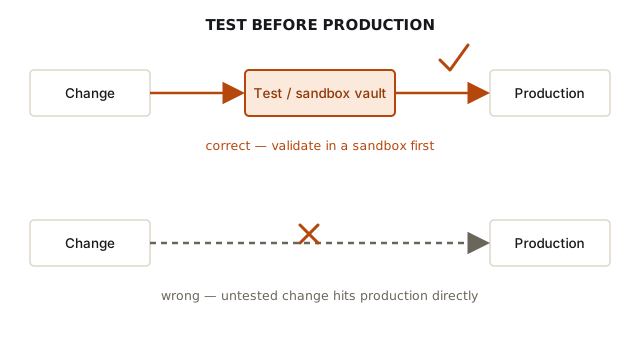
Backup is the piece most new admins underestimate. The database and archive server have to be backed up as a consistent pair — restoring only one produces a vault that references files nobody can find, which is corruption in practice even if neither piece is individually damaged. That same instant, global effect is why workflow, permission, and card changes get tested in a sandbox first: those changes apply to everyone with access the moment they're saved, and a bad one during business hours doesn't inconvenience a single user — it can lock out the floor.